Hotel Amenities Example
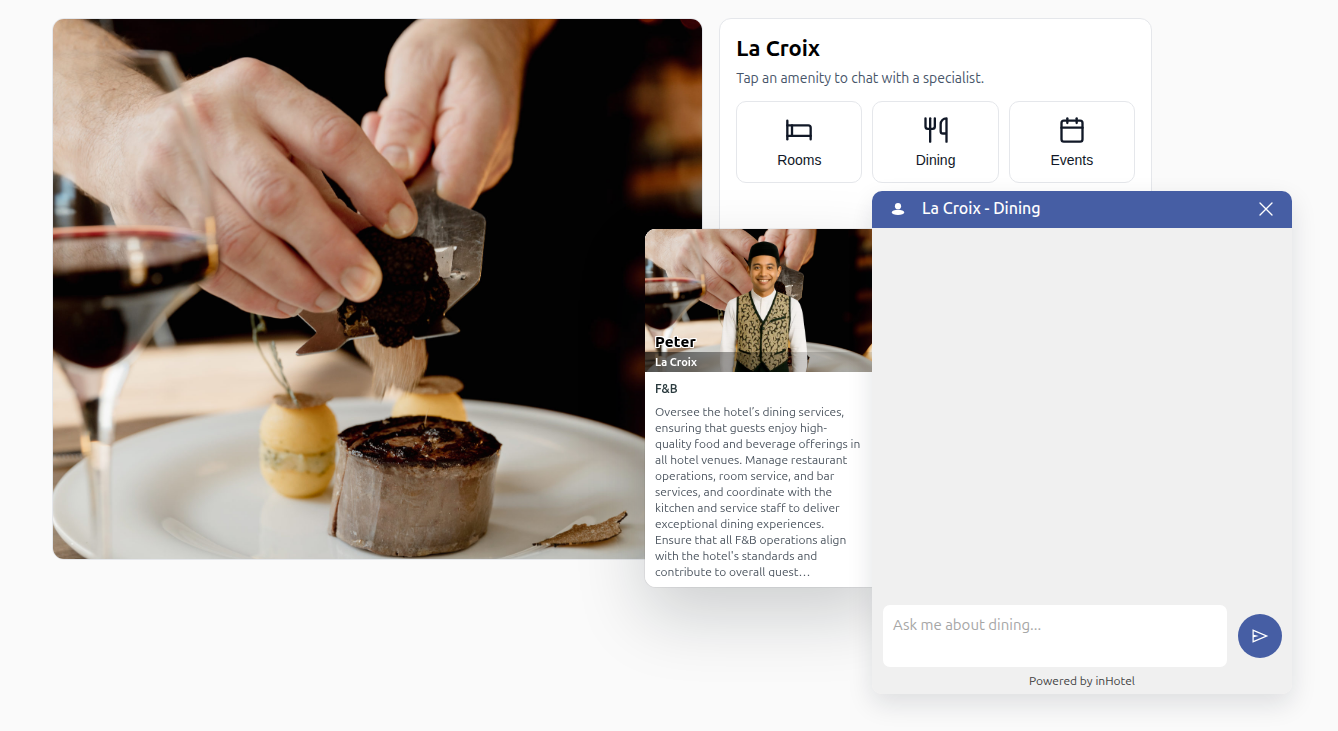
This example renders a hotel details layout and wires amenity buttons to their own agents using an AMENITIES array as the source of truth. On load, it fetches the first agent card to read the hotel name (params.organization.name) and hero image (params.background_image_url), updates the heading and image, inlines Lucide SVG icons (bed, utensils, calendar), and programmatically creates Focus Chat widgets bound via sourceTriggerSelector. Hovering any amenity swaps the hero image to that agent's background_image_url. Each widget title is set to "Hotel Name – Amenity" format, with custom input placeholders, and the embed script loads after configuration.
<!DOCTYPE html>
<head>
  <style>
    :root { --border:#e5e7eb; --muted:#475569; }
    body { font-family: system-ui, -apple-system, "Segoe UI", Roboto, sans-serif; margin:0; padding:24px; background:#fafafa; }
    .details { max-width:1100px; margin:0 auto; display:grid; grid-template-columns: 3fr 2fr; gap:18px; }
    .media img { width:100%; height:100%; max-height:540px; object-fit:cover; border-radius:12px; border:1px solid var(--border); }
    .panel { background:#fff; border:1px solid var(--border); border-radius:12px; padding:16px 16px 20px; }
    .hotel-name { margin:0 0 8px; font-size:22px; }
    .sub { margin:0 0 14px; color:var(--muted); font-size:14px; }
    .amenities { display:grid; grid-template-columns: repeat(3, minmax(0,1fr)); gap:10px; }
    .amenity { display:flex; flex-direction:column; align-items:center; gap:8px; padding:14px; border:1px solid var(--border); border-radius:10px; background:#fff; cursor:pointer; }
    .icon { line-height:1; color:#111827; }
    .icon svg { width:28px; height:28px; display:block; }
    .label { font-size:14px; color:#111827; }
  </style>
</head>
<body>
  <section class="details">
    <div class="media">
      <img id="hotel-image" src="" alt="" />
    </div>

    <aside class="panel">
      <h1 class="hotel-name" id="hotel-name">Loading…</h1>
      <p class="sub">Tap an amenity to chat with a specialist.</p>
      <div id="amenities" class="amenities"></div>
    </aside>
  </section>

  <script>
    // Single source of truth: add/remove amenities here only
    const AMENITIES = [
      {
        id: "rooms",
        label: "Rooms",
        agentCardUrl: "https://38573332-48c8-4fbc-b3ff-0c23ce0e84e3.agents.inhotel.io/.well-known/agent-card.json",
        iconUrl: "https://cdn.jsdelivr.net/npm/lucide-static@0.544.0/icons/bed.svg",
        placeholder: "Ask me about rooms..."
      },
      {
        id: "dining",
        label: "Dining",
        agentCardUrl: "https://a3cc8012-caa9-43af-97e8-220c6f6a2cb5.agents.inhotel.io/.well-known/agent-card.json",
        iconUrl: "https://cdn.jsdelivr.net/npm/lucide-static@0.544.0/icons/utensils.svg",
        placeholder: "Ask me about dining..."
      },
      {
        id: "events",
        label: "Events",
        agentCardUrl: "https://dfc5e7ad-4d34-4cc1-8227-6c751d5a4f02.agents.inhotel.io/.well-known/agent-card.json",
        iconUrl: "https://cdn.jsdelivr.net/npm/lucide-static@0.544.0/icons/calendar.svg",
        placeholder: "Ask me about events..."
      }
      // Add more amenities here (id, label, agentCardUrl, iconUrl, placeholder)
    ];

    // Helpers to read data from agent cards
    const hotelNameFrom = (card) =>
      card?.capabilities?.extensions?.find(e => e?.params?.organization?.name)?.params?.organization?.name || "";

    const bgFrom = (card) =>
      card?.capabilities?.extensions?.find(e => e?.params?.background_image_url)?.params?.background_image_url || "";

    (async () => {
      // Fetch all agent cards keyed by amenity id
      const cards = Object.fromEntries(
        await Promise.all(AMENITIES.map(async a => [a.id, await (await fetch(a.agentCardUrl)).json()]))
      );

      // Canonical hotel name & default hero from the first amenity
      const first = AMENITIES[0].id;
      const hotelName = hotelNameFrom(cards[first]);
      const defaultHero = bgFrom(cards[first]);

      // Set heading and default image
      const imgEl = document.getElementById("hotel-image");
      document.getElementById("hotel-name").textContent = hotelName || "";
      imgEl.src = defaultHero || "";
      imgEl.alt = hotelName ? hotelName + " exterior" : "Hotel image";

      const grid = document.getElementById("amenities");

      // Build buttons, inline icons, hover hero, and Focus Chat instances
      await Promise.all(AMENITIES.map(async (a) => {
        // Button
        const btn = document.createElement("button");
        btn.type = "button";
        btn.id = "amenity-" + a.id;
        btn.className = "amenity";
        btn.setAttribute("aria-label", "Ask about " + a.label.toLowerCase());
        btn.innerHTML = "<span class=\"icon\" aria-hidden=\"true\"></span><span class=\"label\">" + a.label + "</span>";
        grid.appendChild(btn);

        // Inline SVG icon (inherits color)
        const svg = await (await fetch(a.iconUrl)).text();
        btn.querySelector(".icon").innerHTML = svg;

        // Hover swaps hero image and keeps it after hover-out
        const bgUrl = bgFrom(cards[a.id]);
        if (bgUrl) {
          btn.addEventListener("mouseenter", () => {
            imgEl.src = bgUrl;
            imgEl.alt = hotelName ? hotelName + " - " + a.label : "Hotel image";
          });
        }

        // Focus Chat widget for this amenity
        const fc = document.createElement("focus-chat");
        fc.setAttribute("agentCardUrl", a.agentCardUrl);
        fc.setAttribute(
          "config",
          JSON.stringify({
            title: hotelName ? hotelName + " - " + a.label : a.label,
            sourceTriggerSelector: "#amenity-" + a.id,
            inputMessagePlaceholder: a.placeholder
          })
        );
        document.body.appendChild(fc);
      }));

      // Load Focus Chat after all widgets are configured
      const s = document.createElement("script");
      s.src = "https://embed.agents.inhotel.io/focus-chat/latest/focus-chat.min.js";
      document.body.appendChild(s);
    })();
  </script>
</body>
</html>
Key Features
Dynamic Content Loading
- Fetches hotel name and hero image from agent card data
- Updates page content dynamically based on agent card parameters
- Uses
params.organization.nameandparams.background_image_url
Interactive Amenity Buttons
- Each amenity has its own specialized agent
- Hover effects swap hero images to show relevant content
- Custom placeholders for each amenity type
Scalable Configuration
- Single
AMENITIESarray as source of truth - Easy to add/remove amenities by updating the array
- Consistent structure for all amenity configurations
Accessibility Features
- Proper ARIA labels for amenity buttons
- Semantic HTML structure
Use Cases
Perfect for:
- Hotel websites with multiple service departments
- Resort properties with various amenities
- Multi-service businesses with specialized agents
- Event venues with different booking types
- Restaurant chains with location-specific agents
Next Steps
- Learn about agent grid setups
- Explore context-aware implementations
- Review configuration parameters